
Keyboard Platform






Results for Keyboard Platform
A keyboard tray is a support surface that holds your keyboard and mouse just below the main desktop. It mounts underneath a desk and slides out when you type, then tucks back out of sight when you finish. The purpose is to move the typing surface off the desk and set it at a lower, more natural level for your hands and arms. By lowering the keyboard and separating it from the desktop, a tray frees up room on the desk, encourages a straighter wrist position, and helps you sit comfortably through longer stretches of typing.
Most models fall into a few clear types. A height and angle adjustable slide-out tray fixes to the underside of the desk with a bracket and lets you set the height, tilt, and swivel so your wrists stay neutral. A no-drill clamp-on version grips the desk edge with a C-clamp, so it installs without screws or holes and suits rented or glass-topped desks. A corner tray is shaped to sit in the angle of an L-shaped desk and recover the space a straight tray would waste. Tray widths commonly run from about 25 to 27 inches, with depths near 9.8 to 11 inches, and most hold a full keyboard plus a mouse. Typical uses are home offices, study desks, shared workstations, and gaming or typing setups where desk space is tight.
Four things decide what you need:
- Mount type: check whether you can screw into the desk or need a no-drill clamp that grips the edge.
- Desk thickness: measure the front edge, since clamp models fit only up to a stated thickness and screw brackets need a flat underside.
- Tray size: match the width and depth to your keyboard and mouse, and to the gap under your desk.
- Adjustability: decide if you need height, tilt, and swivel for posture, or whether a simple fixed slide-out will do.
Browse the full keyboard platform range to compare sizes and mounts, or see the wider under-desk keyboard tray lineup to find the fit for your workspace.
Keyboard Tray Types at a Glance
The four common tray types differ most in how they mount and how far they adjust, so this view separates them before you compare specific products.
| Type | Mounting Method | Adjustability | Best Desk Shape | Selection Note |
|---|---|---|---|---|
| Screw-mount adjustable tray | Bracket screwed to desk underside | Height, tilt and swivel | Standard flat desks with a solid underside | Pick this when posture control matters most for long typing |
| No-drill clamp-on tray | C-clamp grips the front edge | Usually fixed angle | Rented, glass or thin-edge desks | Choose when you cannot or will not drill the desktop |
| Corner tray | Bracket set into the desk angle | Limited, mostly fixed | L-shaped and corner desks | The space-saver when a straight tray wastes the corner |
| Fixed slide-out tray | Rails under a flat desktop | None beyond sliding | Simple home or office desks | The basic option when you only need to clear desk space |
Professional and High Quality VEVOR Keyboard Tray: A Silent Friend of Everyone in the Home and Offices
A regular desk with a straightforward flat top is called a fixed desk. Place the mouse and keyboard directly on the desk. Families, schools, and businesses often use these desks. They can, however, take up more space on the desktop surface and occasionally seem less comfortable for typing over long hours.
Does the regular desk give you a comfy vibe for a whole day of work? Then, Which Item offers the most comfortable, silent vibe for your work?
The keyboard tray under desk is the best option for you if you wish your workplace to be very comfortable and tidy. Your mouse and keyboard have their own ideal locations thanks to a clever sliding tray under the desk, so the main desk stays tidy. This also gives you more workspace and keeps everything tidy. Furthermore, correcting your typing posture helps your body be far less stressed during long hours spent at the computer. Keyboard trays convert any space into a warm, productive zone.
Features of VEVOR Keyboard Tray:
There are mainly different features regarding the VEVOR computer Keyboard Tray:
Changing Height
So your hands are at the ideal level, you may modify the tray's height by up to about 7.5 inches. This helps to ease your arms and wrists. For extended work sessions, it increases typing ease. One can adapt it for various seats or people.
Tilt and twisting care
Horizontally, the tray can revolve 180°; vertically, it can tilt up to 38°. This lets you arrange your keyboard precisely as you choose. While typing, it helps to keep your wrists straight. This is a great tool for reducing fatigue over extended use.
Extensive surface area
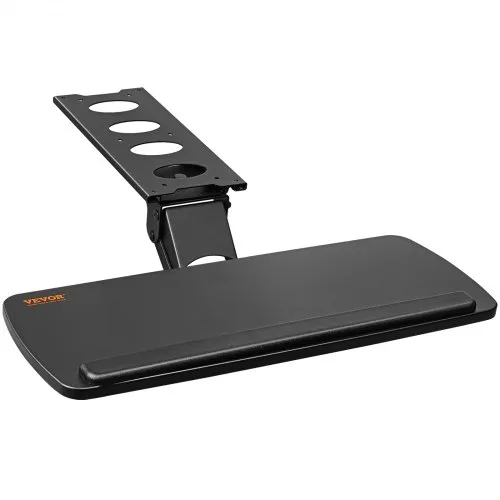
To store your mouse and keyboard, the keyboard tray under desk is roomy (about 25 x 9.8 inches). Also, sufficient space for tiny desk objects. This clears your major desk surface of clutter. You might feel more concentrated in a cleaner workstation.
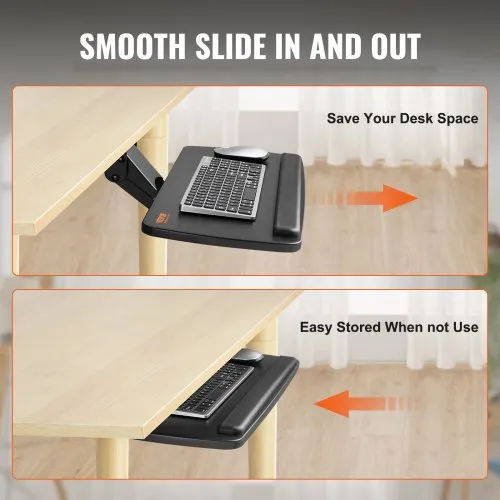
Smooth Slide-Out Architecture
When your keyboard is required, it glides out effortlessly. To save space, slide it under the desk when you have finished it. This helps to keep your desktop clean and neat. Accessing the keyboard is made easy thanks to the slick design.
Ergonomic Wrist Relaxation
To help your hands, there is a built-in wrist rest. This lessens strain on your wrists while you type. It softens marathon keyboard work. The keyboard is also kept safe when tilted, thanks to the wrist rest.
Does the VEVOR Keyboard Tray under Desk tool have tool-free adjustments and be easy to install?
Without question! Designed for simple installation, the VEVOR underdesk keyboard tray includes all the necessary hardware and directions; no additional tools are needed. Simple knobs let you easily change the height, slant, and swivel. This lets you fast adapt your workstation and experience a pleasant, ergonomic keyboard in no time.
Varieties of VEVOR Keyboard trays:
Clamped Keyboard Tray
Instead of screws, a clamp-on keyboard tray is fastened to the desk utilizing robust clamps. Installing and removing are very simple; thus, it is a great choice for those who prefer not to drill holes in their desks. Common uses for this kind of tray are home offices and temporary workstations.
Pull-out Keyboard Tray
Under the desk with sliding rails is a slide-out VEVORkeyboard tray. When the user must type, it can be pulled out; when not in use, it can be driven back beneath the desk. Many businesses employ this kind since it saves space and helps to arrange the desk better. Offers a comfortable typing posture as well.
Corner Keyboard Tray
Corner or L-shaped desks call for a particular design of a corner keyboard tray. The corner space fits well and is utilized effectively. Without taking up much space, it offers a pleasant typing stance. This makes it a fantastic choice for study arrangements and small workplaces.
Choosing a Keyboard Tray by Workspace
Once you know the types, the harder question is which one suits your actual desk and use, so this table maps common setups to the one thing to check before you buy.
| Workspace Setup | Priority Feature | What to Check First | Why It Fits |
|---|---|---|---|
| Fixed-height desk, long hours | Height and tilt adjustment | That the underside is flat and clear | Lowering the tray fixes a desk that sits too high |
| Rented or glass-topped desk | No-drill clamp mount | Edge thickness against the clamp limit | Clamps leave no holes, so your deposit stays safe |
| Corner or L-shaped desk | Corner-fit tray shape | Diagonal clearance in the corner | Uses dead corner space a straight tray cannot reach |
| Gaming or sim racing rig | Wide, sturdy surface | Load rating and locked, wobble-free rails | A steady surface stops keys bouncing during fast play |
| Small or shared desk | Compact slide-out | Depth of the gap under the desk | Tucks fully away to free the top between users |
How to Keep an Underdesk Keyboard Tray Clean and Tidy?
Do you feel like the working desk is messy and feels irritating?
So here is the best choice for you to keep the keyboard tray for the desk neat and clean, plus looking like new. Additionally, a few basic steps and little care will keep your workplace stable.
Clean with a Soft Cloth
To eliminate dust or fingerprints from the tray's surface, gently wipe it with a wet, soft cloth. Steer clear of aggressive compounds that could harm the glossy surface.
Check the bolts
Once in a while, verify the screws on the carbon steel frame to make sure they are still secure. This maintains wobble-free stability for the foundation.
Maintain Smooth Track and Foam wrist set.
Wipe the metal tracks to remove any debris if the tray starts to feel tight. Every time you use it, you want the tray to slide smoothly. If your keyboard tray has a high-density foam wrist rest, aim to keep it dry. This keeps the stuff in form and supports without drooping over time.
Does a keyboard tray function on every kind of desk?
Not absolutely. Before making a purchase, examine the underside of your table. A thick metal frame on your desk or a support beam right where the tray would sit might obstruct the installation. Before purchasing, always check under your desk for a flat, clean surface.
Best-Seller Comparison
VEVOR currently lists two distinct keyboard tray models, and they sit at opposite ends of the range, so the choice comes down to adjustability versus a larger no-drill surface.
| Product | Tray Size | Mount Type | Height Adjustment | Tilt | Swivel | Wrist Rest | Best For |
|---|---|---|---|---|---|---|---|
| Adjustable Keyboard Tray, 25 x 9.8 in | 25 x 9.8 in | Screw-on under-desk bracket | 7.5 in | 38° | 180° | Built-in | Only fully adjustable tray here; posture-focused long typing |
| No-Drill Clamp-On Tray, 26.8 x 11 in | 26.8 x 11 in | No-drill C-clamp | Fixed by desk | None | None | Not included | Largest surface here; no-drill fit for rented desks |
Buy and Shop Now the Best and Smartest VEVOR Keyboard Tray:
The ideal keyboard trays really make users feel at ease at the end of the workday, rather than having to change desks or positions. Similarly, VEVOR can meet your needs for an inexpensive, adjustable basic office computer tray. Fast shipping, 30-day free returns, and a long-term warranty are all offered by VEVOR as well. Finally, investigate these computer furniture goods and give your house a highly superior workspace.
FAQs
Are there stylish keyboard trays that fit modern office desks?
Yes. Slim slide-out trays in black finishes with a low-profile bracket sit flush under the desk and stay hidden until you pull them out, which keeps a modern setup clean. Match the tray width to your desktop and pick a mount that suits your desk material.
How do I choose the right adjustable keyboard tray for my workspace?
Start with how much adjustment you need: look for height, tilt, and swivel if you type for hours, or a simpler tray if not. A adjustable ergonomic keyboard tray lets you set a neutral wrist position. Then match the tray size and mount type to your desk.
What are the benefits of using an ergonomic keyboard tray under my desk?
An under-desk tray lowers your keyboard toward elbow height, which keeps wrists straighter and eases shoulder and neck strain during long sessions. It also clears the desktop, so you gain working space, and it lets you push the keyboard away when you need the surface for other tasks.
How do I install a keyboard tray under my desk easily?
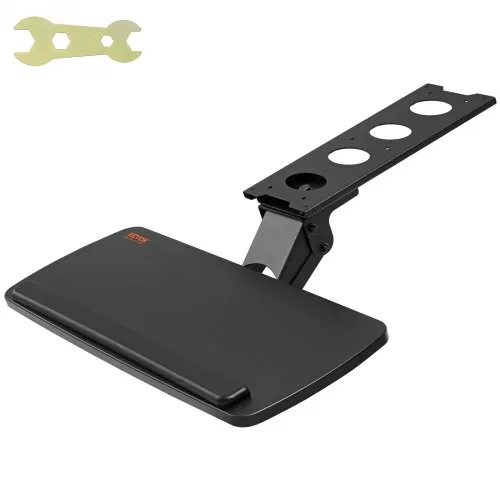
The easiest route is a no-drill C-clamp mount, which grips the front edge of the desk and needs no holes. Screw-bracket trays take a little longer but include the hardware and a wrench. Clear the underside first and confirm your desk edge or thickness suits the mount.
What are the best keyboard trays for sim racing setups?
For sim racing, choose a wide, sturdy tray that holds a full keyboard and mouse without flexing when you hit keys mid-race. A firm slide-out that tucks away keeps the wheel area clear. Check the load rating and that the mount locks tight so it will not wobble.
Are keyboard trays good for ergonomics?
Yes, when set up correctly. Positioning the keyboard just below the desktop lets your elbows stay near 90 degrees and your wrists stay neutral, which reduces the strain a too-high desk creates. A tray with tilt and height adjustment makes reaching that posture easier to hold.
Are keyboard trays worth the money?
For anyone who types for hours, usually yes. A tray is a much smaller outlay than replacing a desk or chair, yet it fixes a keyboard that sits too high, a common cause of wrist and shoulder discomfort. If your desk height already suits you, the gain is smaller.
How wide should a keyboard tray be?
Pick a width that fits both your keyboard and mouse side by side, which usually means about 25 to 27 inches for a full-size keyboard. Measure your keyboard first, then leave room for mouse movement. Compare sizes across the keyboard platform collection and check the width against the clear space under your desk.
Can a keyboard tray work with a standing desk?
Yes, many trays mount to a standing desk, but adjustable-height desks move, so the tray must clamp or bolt firmly and clear the frame through its full range. Browse the under-desk keyboard tray range and confirm the edge thickness and rail clearance first.
Does a keyboard tray reduce knee clearance under the desk?
It can, since the tray and its rails sit below the desktop and take up a few inches of height. Measure the gap between your thighs and the desk underside before buying, and favour a thin, flat tray if clearance is already tight on your setup.