

Unlock the full potential of your VEVOR Electronic Price Computing Scale with our comprehensive product manual. Designed for the 66 LB Digital Deli Weight Scales, this manual is an essential guide for anyone using these advanced LCD & LED Digital Commercial Food Fruit Meat Produce Counting Weight scales. Whether you’re operating in a retail store, kitchen, restaurant, market, or farmer’s market, our manual will walk you through every step of setup, troubleshooting, and optimization.
Our user-friendly manual ensures you get the most out of your scales, with detailed instructions and clear illustrations that make it easy to follow along. Learn how to calibrate your scale for accurate measurements, navigate through the various functions, and troubleshoot common issues with ease. This manual is a valuable resource for ensuring your scales operate smoothly and efficiently, saving you time and enhancing productivity.
Download the VEVOR Electronic Price Computing Scale manual today and streamline your weighing processes. With comprehensive guidance at your fingertips, you’ll master the intricacies of your digital scales, ensuring precise and reliable performance in any setting.
VEVOR Electronic Price Computing Scale User Manual
MODEL: TM-30F
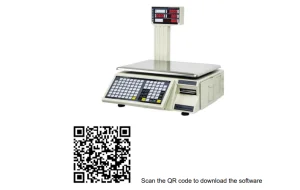
Software Install
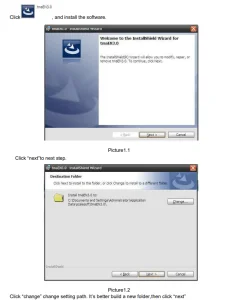
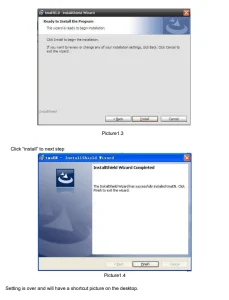
Operation Manual
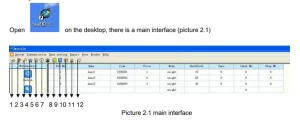
Picture 2.1 The arrows mean:
- merchandise setting
- label setting
- hotkey setting
- advertisement information setting
- text information setting
- clock setting
- Other parameter setting
- record query
- daily report
- monthly report
- stall query
- about mscale
Communication
Mode
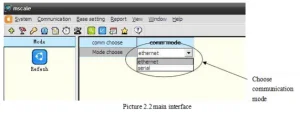
Choose communication mode, and then choose communication mode “ethernet” or “serial”
Ethernet
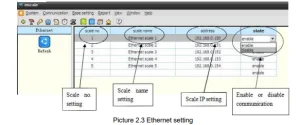
Choose communication Ethernet, and then set scale number, scale name, scale IP address, and state setting.
Serial
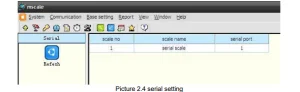
Choose the communication Serial, then set the scale number, scale name, and serial port. Like picture 2.4
IP Searching and Setting
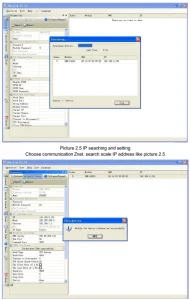
Base setting
Merchandise
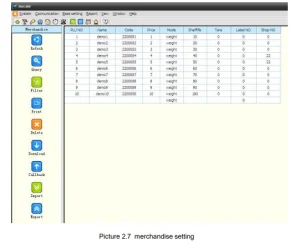
Merchandise settings include query, filter download, callback, import, export, etc. Choose base setting merchandise, open the window as shown in picture 2.7, and fill in the merchandise information. (Blank can be empty, but Plu Number can not be).
Query
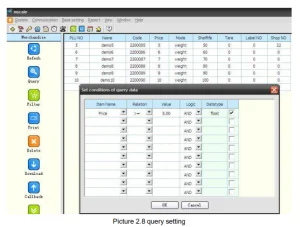
Choose base setting merchandise, click query like picture 2.8, item name choose item, For example, item name choose price, relation choose >=, value choose 5.00, means when the price >=5, can show merchandise information, like picture 2.8
Filter
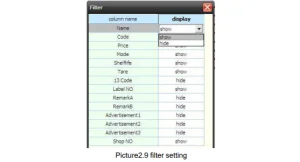
Filter means show or hide every merchandise information column, like picture 2.9
Delete
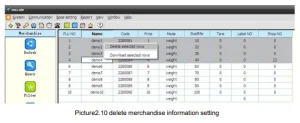
Delete means delete one or some selected merchandise information, like picture 2.10
Download
Before downloading, first choose communication, as shown in picture 2.2. If it is Ethernet scale, first set the scale IP address, as shown in picture 2.3.
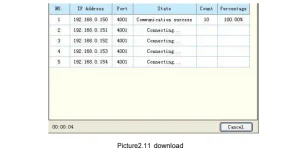
Choose the base setting merchandise download, then select the scale IP address, like picture 2.11, and select some merchandise information, then download, like picture 2.10
Callback
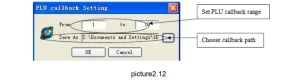
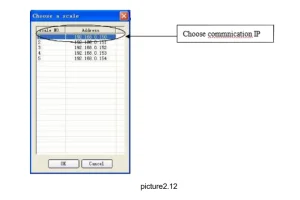
Choose the base setting merchandise callback, like picture 2.12
Export
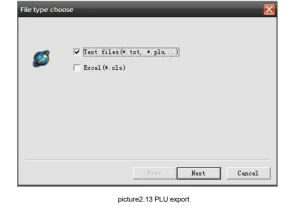
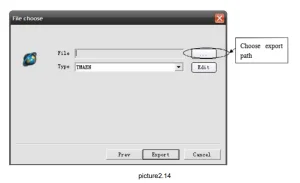
Choose the base setting merchandise export, like picture2.13, and select the file type “text files” or “Excel”.
Import
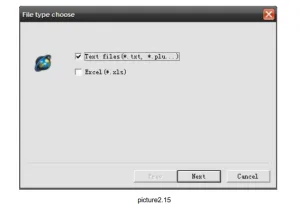
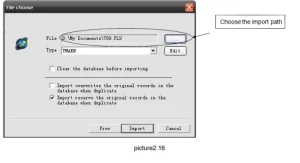
Choose base setting merchandise import, like picture2.15, choose file type “text files” or “Excel”. Then click “next”, like picture 2.15, then choose import type and path, and click “import”.
If you choose “clear the database before importing”, it will clear all original PLU information.
Label
label setting main include download and callback
New
Label setting simulates each tag item’s position in the actual label. Each tag item has coordinates; you can drag it to change its position in the actual label.
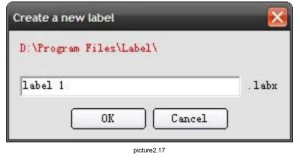
Choose base setting label new, new build a new label, like picture 2.17
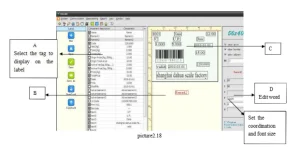
Like picture 2.18, create a new label. Select the left frame A area. It will have an item in the B area. Then, drag it to the C area. If it is text, you can edit it on the right D area. The set is over. You can save it or download it.
NOTE: Set the weight , and set the active net.
Hotkey
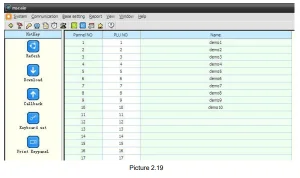
Hotkey mains include download, callback, and keyboard set. Choose the base setting hotkey, as shown in picture 2.19, and put the panel number, PLU number, and merchandise name. Download and callback is the same merchandise.
Advertisement
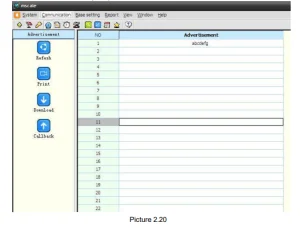
Choose a base setting advertisement, like picture 2.20, in the “advertisement” column. Edit the advertisement and download or call back.
Same as Label Setting, If want modify current scale, callback the current settings thenstart modify. Click the Download button to return back (save).
Text
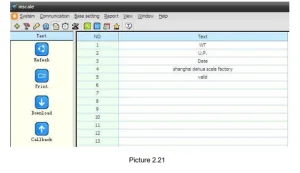
Choose base setting text, like picture 2.21, on the “text” column, edit the text and download or callback.
Clock
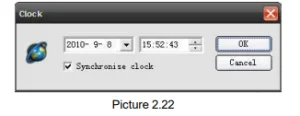
Choose the base setting clock, as shown in picture 2.22. Set the scale Time to be the same as the computer.
Other
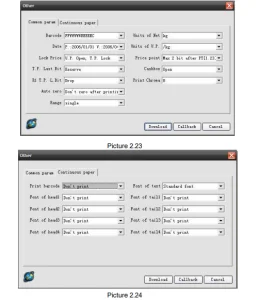
Choose a base setting other than, like picture 2.23
Other main parameters include standard parameters and continuous paper setting. Same as Label Setting, If you want to modify the current scale, call back the current settings, then start modifying—click the Download button to return (save) to the scale.
Initial
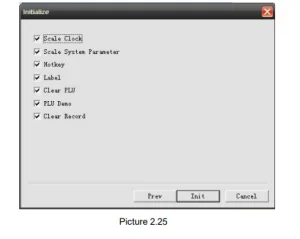
Initialisation (picture 2.25), primary function: Clear sales data; Clear PLU database in the scale; Initialise system parameter. This function is usually used in the factory. If you must use it, suggest callback the PLU and sales data, to avoid losing the data in the scale.
Report
The report includes the record query, the daily report, and the monthly report.
Record query
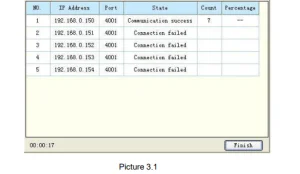
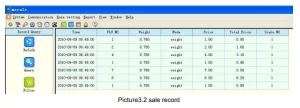
Choose report record query callback, like picture 3.1, click finish, like picture 3.2, detail sales report. Picture 3.1 record callback.
Daily report
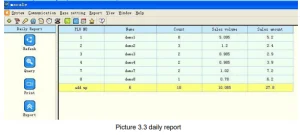
Choose the daily report callback, like picture 3.3
Monthly report
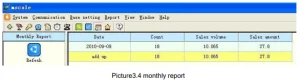
Choose the monthly report callback, like picture 3.4
Stall report
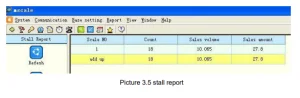
Choose the report stall report callback, like picture 3.5
Recommended For Your Project
VEVOR Electronic Price Computing Scale, 66 LB Digital Deli Weight Scales, LCD & LED Manual
Reviews
There are no reviews yet.