
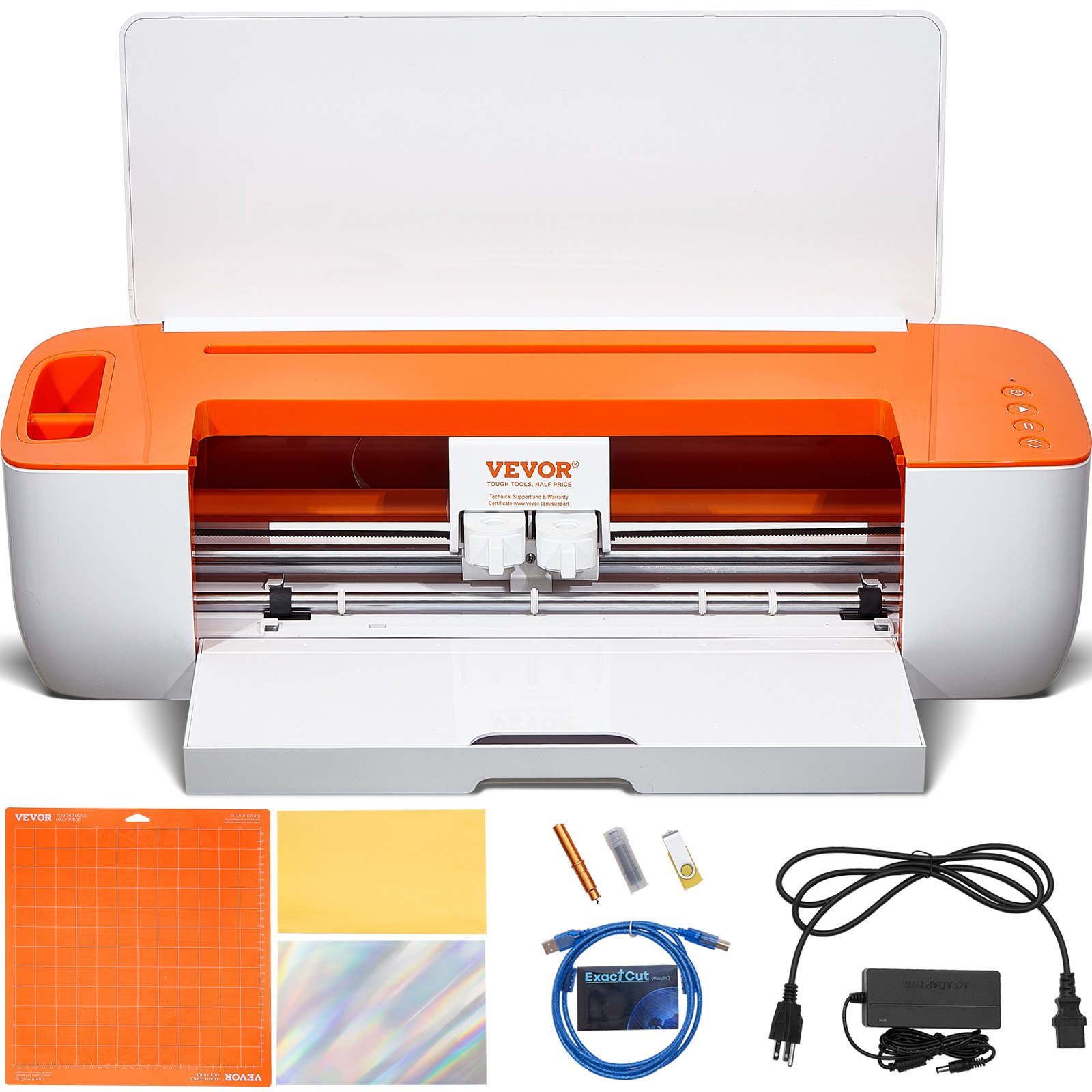
Unlock the full potential of your VEVOR Vinyl Cutter Machine with our comprehensive product manual download. Designed for both novice and experienced users, this manual is your ultimate guide for setting up, troubleshooting, and optimizing your Bluetooth Connectivity DIY Cutting Machine.
Whether you are creating customized cards, home decor, or any other DIY project, our detailed instructions ensure a seamless experience across all platforms, including iOS, Android, Mac, and Windows. Packed with easy-to-follow steps, troubleshooting tips, and optimization techniques, this manual will help you make the most of the massive designs included with your VEVOR Vinyl Cutter Machine.
Enhance your creativity and efficiency with our user-friendly guide that transforms complex tasks into simple, manageable actions. Download now and start creating with confidence!
MODEL: SMART 1
This is the original instruction. Please read all manual instructions carefully before operating. VEVOR reserves the right to interpret our user manual. The appearance of the product shall be subject to the product you received. Please forgive us for not informing you again if there are any technology or software updates on our product.
Bacic Safety Rules
WARNING: Read all safety warnings, instructions, illustrations, and specifications provided with this appliance. Failure to follow all instructions listed below may result in electric shock, fire, and/or serious injury.
- Protective material must be removed before turning on the cutting plotter.
- Check the label on the back side of the plotter to confirm that the rated voltage required by the plotter matches the voltage of the power base.
- First, ensure the power switch is off, then plug the power supply into a grounded power outlet.
- Do not operate any appliance with a damaged cord or plug, or after the appliance malfunctions, or has been damaged in any manner. Return the appliance to the nearest authorized service facility for examination, repair, or adjustment.
- Type X attachment: If the supply cord is damaged, it must be replaced by a special cord or assembly available from the manufacturer or its service agent.
- Please do not touch the power cord with wet hands to avoid an electric shock.
- Please only use this product’s power cord, data cable, or manufacturer-approved replacements.
- Do not use outdoors. INDOOR USE ONLY
- Please do not drop metal objects and liquids into the machine to avoid malfunction.
- After shutting down, you must wait another 5 seconds to turn on the cutting plotter again, otherwise, it will cause damage to the cutting plotter.
- In thunderstorms, turn the power switch to OFF and unplug the power cord.
- Please do not privately change the manufacturer’s components.
- The manufacturer reserves the right to change product specifications without prior notice.
- The manufacturer only bears the legal obligations of the product sold to other users, and does not bear other losses caused by the product’s malfunction.
- Without our company’s permission, no part of this manual can be copied or transmitted under any name.
- Do NOT drag the carriage by hand.
- If there is an abnormal sound after powering on the machine, please turn off the power immediately and contact the after-sales department for feedback.
- This appliance can be used by children aged from8 years and above and persons with reduced physical, sensory, or mental capabilities or lack of experience and knowledge if they have been given supervision or instruction concerning using the appliance safely and understand the hazards involved. Children shall not play with the appliance. Children shall not perform cleaning and user maintenance without supervision.
- Close supervision is necessary when any appliance is used by or near children. Children shall not use the appliance. Cleaning and user maintenance shall not be made by children.
- Do not immerse cords, plugs, or appliances in water or other liquids to protect against fire, electric shock, or personal injury.
WARNING:
The blade is very sharp. Please do not touch the blade directly with your hand; otherwise, your finger will be injured and the tip will be blunt. And hold the barrel on the blade when you remove it.
Matters Needing Attention
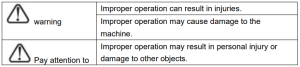
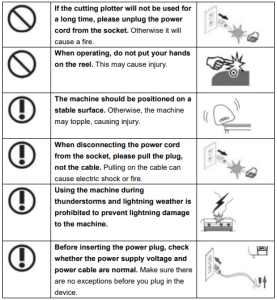
To ensure that the operator can correctly use the plotter and prevent damage, please follow the instructions marked with the following indicators.
Ensure Safe Use Methods
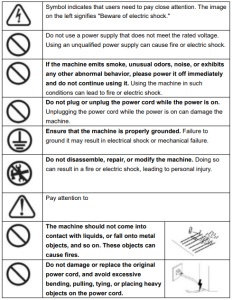
Symbol Description
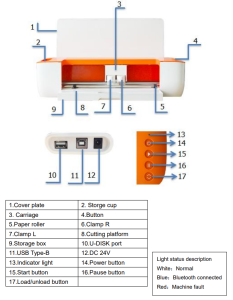
 Introduction to Main Parts
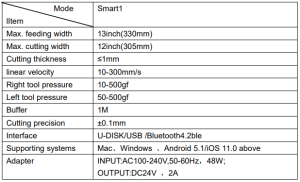
Vinyl Cutter Machine Technical Parameters
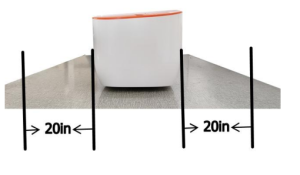
Product Assembly Steps
Keep 20 inches clear of obstructions before and after.
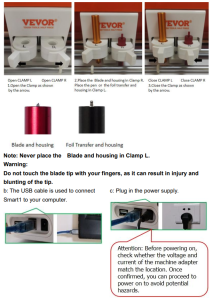
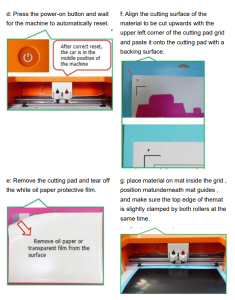
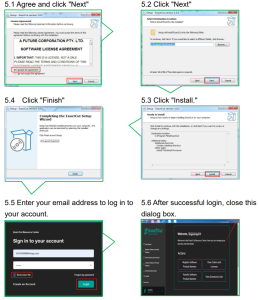
Vinyl Cutter Machine Software Installation
- Download the corresponding version of the software installation through the link https://get.exact-cut.com/
- Before installing the software, find the refrigerator sticker with the software PSN code in the accessory box.
- Enter the given link in your browser to access the registration screen.
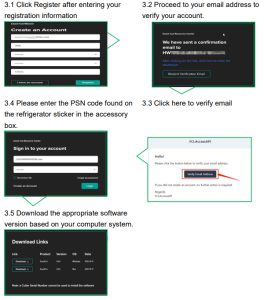
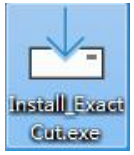
4. Double-click the desktop installation package
5. Install the program in order.
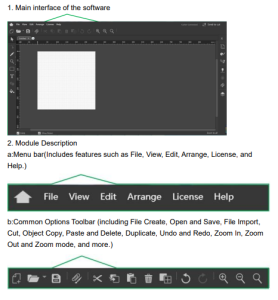
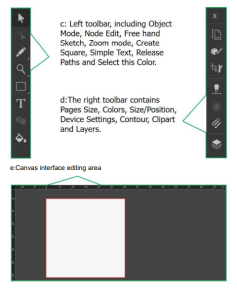
Vinyl Cutter Machine Software Function Description
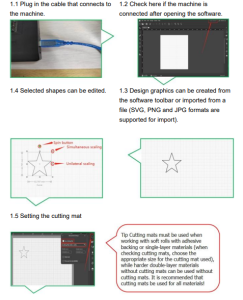
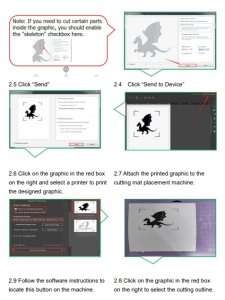
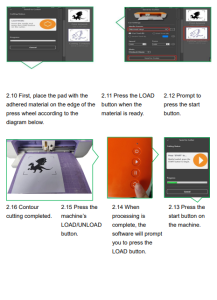
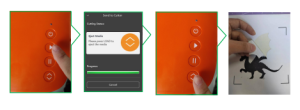
Software Output Cutting
1. Normal Cutting Output
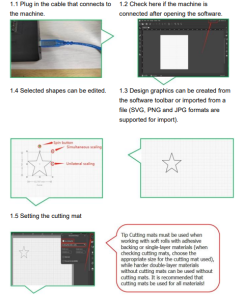
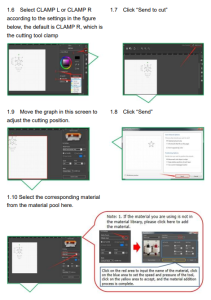
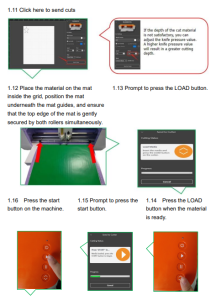
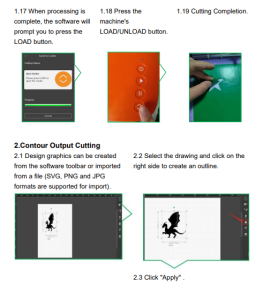
Vinyl Cutter Machine APP Installation and Use
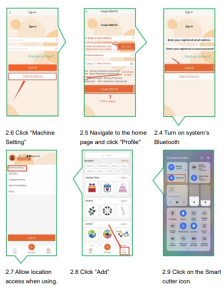
To pair your machine with mobile devices featuring Bluetooth wireless technology, ensure that Smart1 is turned on and within a distance of no more than 15 feet.
1. Software Download. You can download the APP software by following the link below. http://api.cutterplotter.cn/index/d
2. Open the app, register for an account, and log in.
2.1 Create a new account.
2.2 Fill in the corresponding information in order.
2.3 Enter your account number and click “SIGNIN”.
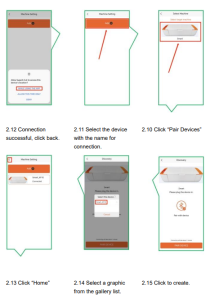
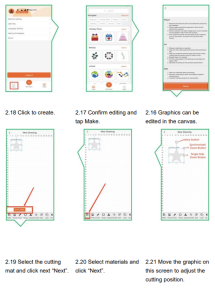
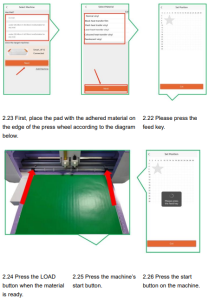
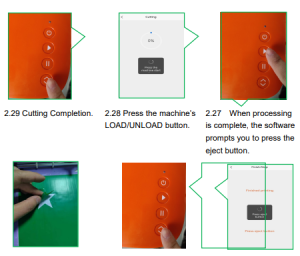 Frequently Asked Questions
Q: What if the software shuts down during the cutting process and gets stuck?
A: Click “Force Abort” in the software.
Q: The default knife pressure in the material library has been used for cutting for a while. How can it no longer cut through the material?
A: It’s time to replace the blade; the tip is dull and not sharp enough.
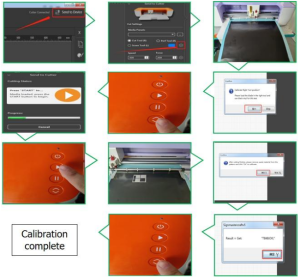
Q: What should I do if there is a deviation in contour cutting?
A: Follow the steps below to perform automatic calibration
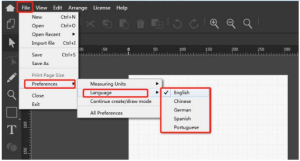
Q: How do I switch the language of the software?
A: Follow the instructions below to switch languages.
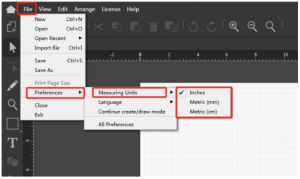
Q: How do we change the measuring units?
A: Please follow the steps below to switch between units.
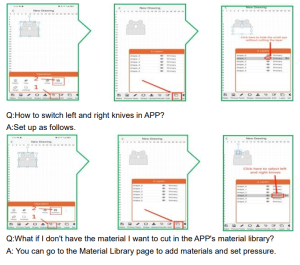
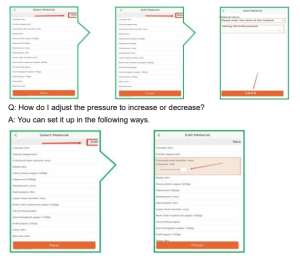
Q: How to cut in layers in APP?
A: Please follow the steps below.
 Q: Why doesn’t it recognize the USB flash disk?
A: The format of your USB flash disk may not be supported. Support format: FAT and FAT32. Unsupported format: NTFS and exFAT
FCC Information
CAUTION: Changes or modifications not expressly approved by the party responsible for compliance could void the user’s authority to operate the equipment!
This device complies with Part 15 of the FCC Rules. Operation is subject to the following two conditions:
- This product may cause harmful interference.
- This product must accept any interference received, including interference that may cause undesired operation.
WARNING: Changes or modifications to this product not expressly approved by the party responsible for compliance could void the user’s authority to operate the product.
Note: This product has been tested and found to comply with the limits for a Class B digital device according to Part 15 of the FCC Rules. These limits are designed to protect reasonably against harmful interference in a residential installation.
This product generates, uses, and can radiate radio frequency energy, and if not installed and used per the instructions, may cause harmful interference to radio communications. However, there is no guarantee that
Interference will not occur in a particular installation.
If this product causes harmful interference to radio or television reception, which can be determined by turning the product off and on, the user is encouraged to try to correct the interference by one or more of the following measures.
- Reorient or relocate the receiving antenna.
- Increase the distance between the product and the receiver.
- Connect the product to an outlet on a circuit different from that to which the receiver is connected.
- Consult the dealer or an experienced radio/TV technician for assistance.
CORRECT DISPOSAL OF THE VINYL CUTTER MACHINE
This product is subject to European Directive 2012/19/EC provisions. The symbol showing a wheelie bin crossed through indicates that the product requires separate refuse collection in the European Union.This applies to the product and all accessories marked with this symbol. Products marked as such may not be discarded with normal domestic waste, but must be taken to a collection point for recycling electrical and electronic devices.
Made In China
Recommended For Your Project
VEVOR Vinyl Cutter Machine, Bluetooth Connectivity DIY Cutting Machine Manual

Reviews
There are no reviews yet.