
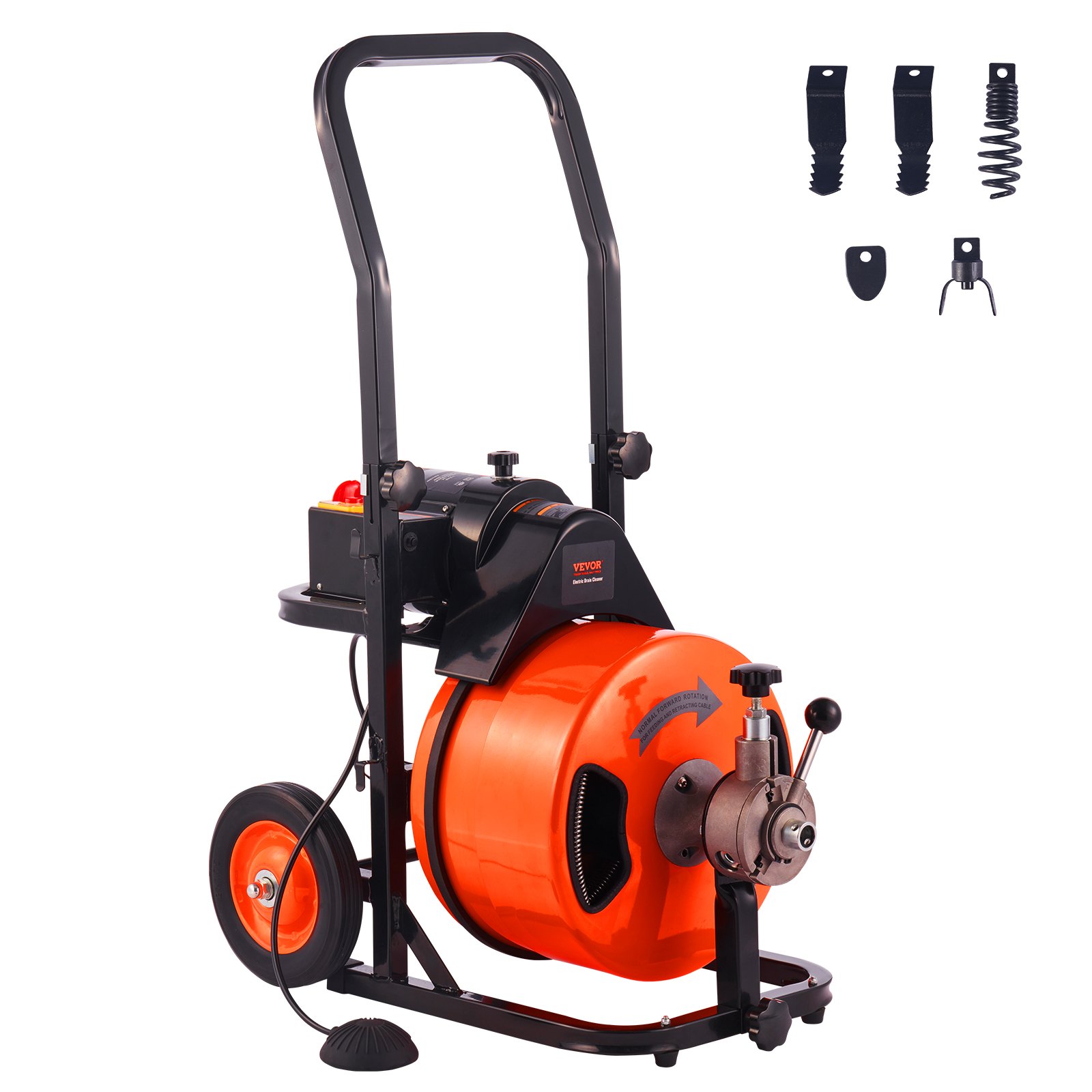

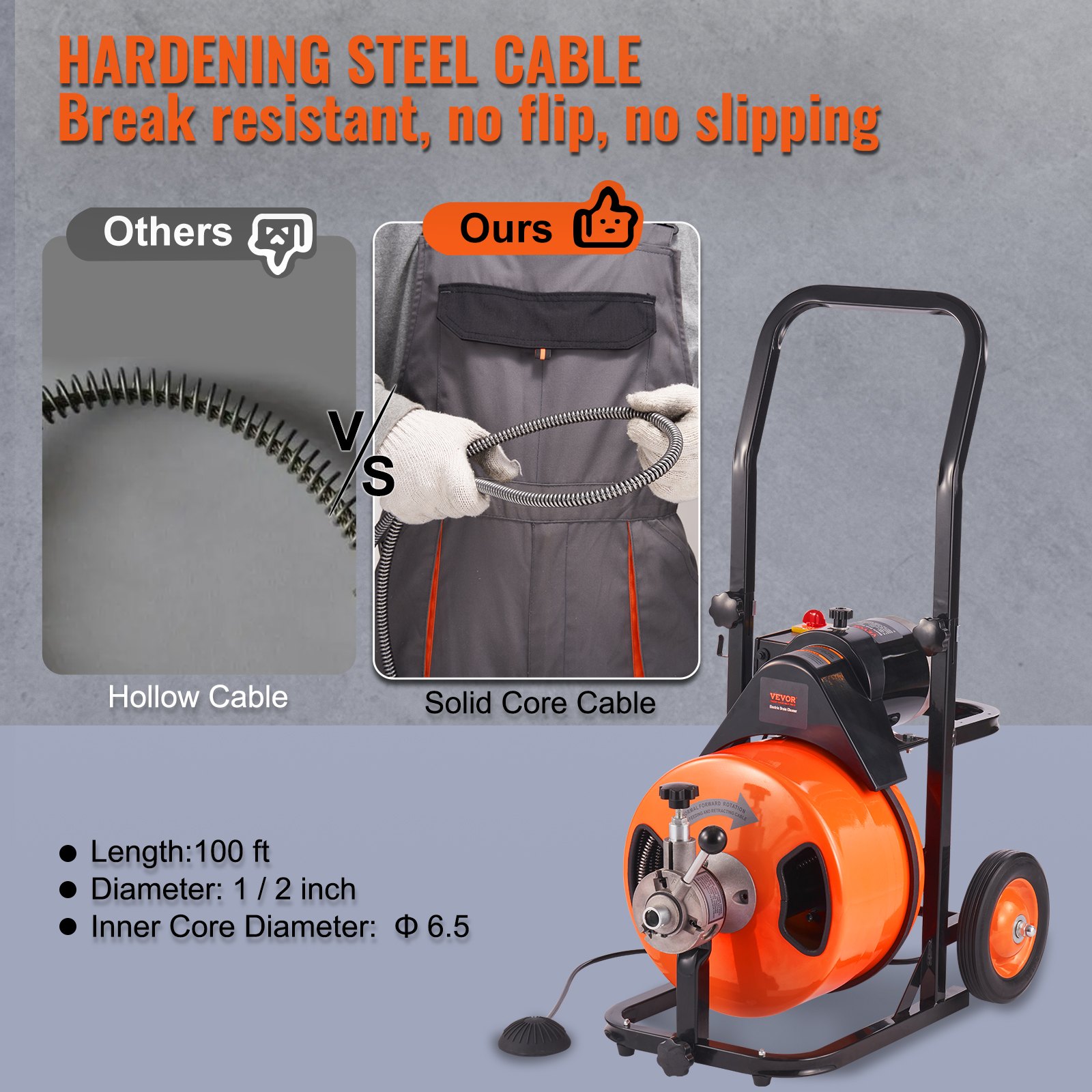


Unlock the full potential of your VEVOR Drain Cleaner Machine 100 FT x 1/2 Inch with our comprehensive product manual. Designed to help you master every aspect of your sewer auger, the manual covers everything from initial setup to advanced troubleshooting.
Whether dealing with 1″ to 4″ pipes, the easy-to-follow instructions ensure you get the job done swiftly and efficiently.
The manual includes detailed sections on using the auto-feed feature, air-activated foot switch, and the four versatile cutters. Follow our expert tips and maintenance guidelines to enhance your cleaning efficiency and extend the lifespan of your equipment. Download now and empower yourself with the knowledge to optimize your drain cleaning tasks like a pro.
ELECTRIC DRAIN CLEANER USER MANUAL
 Keep this manual for safety warnings and precautions, assembly, operating, inspection, maintenance, and cleaning procedures. Write the product’s serial number in the back of the manual near the assembly diagram (or the month and year of purchase if the product has no number). Keep this manual and the receipt in a safe and dry place for future reference.
General Power Tool Safety Warnings
Read all safety warnings and instructions.
Failure to follow the warnings and instructions may result in electric shock, fire, and/or serious injury.
Save all warnings and instructions for future reference.
The term “power tool” in the warnings refers to your mains-operated (corded) power tool.
Work area safety
- Keep the work area clean and well-lit. Cluttered or dark areas invite accidents.
- Do not operate power tools in explosive atmospheres, such as those containing flammable liquids, gases, or dust. Power tools create sparks, which may ignite the dust or fumes.
- Keep children and bystanders away while operating a power tool. Distractions can cause you to lose control.
Electrical safety
- Power tool plugs must match the outlet. Never modify the plug in any way. Do not use any adapter plugs with grounded power tools. Unmodified plugs and matching outlets will reduce the risk of electric shock.
- Avoid body contact with grounded surfaces such as pipes, radiators, ranges, and refrigerators. If your body is grounded, you are at an increased risk of electric shock.
- Do not expose power tools to rain or wet conditions. Water entering a power tool will increase the risk of electric shock.
- Do not abuse the cord. Never use the cord for carrying, pulling, or unplugging the power tool. Keep the cord away from heat, oil, sharp edges, or moving parts. Damaged or entangled cords increase the risk of electric shock.
- When operating a power tool outdoors, use an extension cord suitable for outdoor use. This reduces the risk of electric shock.
Personal safety
- Stay alert, watch what you are doing, and use common sense when operating a power tool. Do not use a power tool while you are tired or under the influence of drugs, alcohol, or medication.
A moment of inattention while operating power tools may result in serious personal injury. - Use personal protective equipment. Always wear eye protection.
Safety equipment such as a dust mask, non-skid safety shoes,a hard hat, or hearing protection, used under appropriate conditions, will reduce personal injuries. - To prevent unintentional starting, ensure the switch is in the off position before connecting to the power source or picking up or carrying the tool.
Carrying power tools with your finger on the switch or energizing power tools that have the switch on invites accidents. - Remove any adjusting key or wrench before turning the power tool on.
A wrench or key left attached to a rotating part of a power tool may cause personal injury. - Do not overreach. Keep proper footing and balance at all times.
This enables better control of the power tool in unexpected situations. - Dress properly. Do not wear loose clothing or jewelry. Keep your hair, clothing, and gloves away from moving parts. Loose clothes, jewelry, or long hair can be caught in moving parts.
- Only use safety equipment that an appropriate standards agency has approved.
Unapproved safety equipment may not provide adequate protection. Eye protection must be ANSI-approved, and breathing protection must be NIOSH-approved for the specific hazards in the work area.
Power tool use and care
- Do not force the power tool. Use the correct power tool for your application.
The correct power tool will do the job better and safer at the rate for which it was designed. - Do not use the power tool if the switch does not turn it on and off.
Any power tool that cannot be controlled with the switch is dangerous and must be repaired. - Disconnect the plug from the power source before making any adjustments, changing accessories, or storing power tools.
Such preventive safety measures reduce the risk of accidentally starting the power tool. - Store idle power tools out of the reach of children. Do not allow persons unfamiliar with the power tool or these instructions to operate the power tool. Power tools are dangerous in the hands of untrained users.
- Maintain power tools. Check for misalignment or binding of moving parts, breakage of parts, and any other condition that may affect the power tool’s operation. If damaged, have the power tool repaired before use. Poorly maintained power tools cause many accidents.
- Keep cutting tools sharp and clean.
Properly maintained cutting tools with sharp cutting edges are less likely to bind and are easier to control. - Use the power tool, accessories, tool bits, etc., in accordance with these instructions, taking into account the working conditions and the work to be performed.
The use of power tools for operations that are different from those intended could result in a hazardous situation.
Service
Have your power tool serviced by a qualified repair person using only identical replacement parts.
This will ensure that the safety of the power tool is maintained.
Drain Cleaner Safety Warnings
- Maintain the tool’s labels and nameplates. These carry important safety information. If they are unreadable or missing, contact Harbor Freight Tools for a replacement.
- Wear ANSI-approved safety impact eye goggles and heavy-duty LEATHER work gloves when using the Drain Cleaner. Never grasp a rotating cable with a rag or a cloth glove. Using personal safety devices reduces the risk of injury. Safety impact eye goggles and heavy work gloves are available from Harbor Freight Tools.
- Avoid unintentional starting.
Prepare to begin work before turning on the tool. - Do not force the Drain Cleaner. This tool will do the work better and safer at the speed and capacity for which it was designed.
- Maintain a safe working environment. Keep the work area well-lit. Make sure there is adequate surrounding workspace. Always keep the work area free of obstructions, grease, oil, trash, and other debris. Do not use a power tool in areas near flammable chemicals, dusts, and vapors.
- Unplug the Drain Cleaner from its electrical outlet before performing any inspection, maintenance, or cleaning procedures.
- Do not leave the Drain Cleaner unattended while it is running. If you have to leave it, turn the power off.
- Do not allow the cutter to stop turning. This can overstress the cable and cause twisting, kinking, or breaking, which can cause striking or crushing injuries.
- Keep your gloved hand on the cable whenever the machine is running.
This provides better control of the cable and helps prevent twisting, kinking, and breaking, which can cause striking or crushing injuries. - Before each use, check all nuts, bolts, and screws for tightness.
Standing water and operation may cause these to loosen. - Avoid electrical shock. Do not operate the Drain Cleaner if sitting in standing water, and if the operator is in standing water. Keep extension cord off the ground and away from water. Water increases the risk of electrical shock.
- Install this product on a proper surface. Locate on a flat, level, and solid surface that can support the weight of the Drain Cleaner.
- Do not operate the Drain Cleaner with the belt guard removed.
Fingers can get cut fast by the drive belt and pulley. - Do not put too much stress on the cable. Keep a gloved hand on the cable for control when the machine is running. If the cable encounters an obstruction during drain cleaning, it may stress the cable and cause it to twist, kink, or break. This may result in serious injury and damage to the equipment or pipes.
- Keep the Drain Cleaner within two feet of drain opening. Greater distances can result in the cable twisting or kinking.
- One person must control both the cable and the Foot Switch.
If the foot stops rotating, the operator must be able to turn the machine on and off to prevent the cable from twisting, kinking, or breaking. Twisting, kinking, or breaking the cable may cause striking or crushing injuries. - Reverse Motor direction only when pulling the Cable off an obstruction.
Trying to push the Cable down the pipe or pull it out of a pipe while the motor is turning in reverse may damage the Cable. Make sure the Drum has stopped turning before changing the Rotation Switch. - Keep hands away from the rotating Drum and Distribute Tube.
Do not reach into Drum unless the Drain Cleaner power is off. - Use appropriate personal protective equipment while handling cable and drain cleaning equipment. Drains may contain chemicals, bacteria, and other substances that are toxic, infectious, cause burns, or cause other issues. Appropriate personal protective equipment always includes ANSI-approved safety glasses and heavy-duty work gloves and may include equipment such as latex or rubber gloves, face shields, goggles, protective clothing, respirators, and steel-toed footwear.
- Wash hands after use. Use hot, soapy water to wash hands and other exposed body parts exposed to drain contents after handling or using drain cleaning equipment. Do not eat or smoke while operating or handling drain cleaning equipment. This will help prevent contamination with toxic or infectious material.
Drain Cleaner Safety Warnings (cont.)
Vibration Safety
This tool vibrates during use.
Repeated or long-term exposure to vibration may cause temporary or permanent physical injury, particularly to the hands, arms, and shoulders. To reduce the risk of vibration-related injury:
- Anyone using vibrating tools regularly or for an extended period should first be examined by a doctor and then have regular medical check-ups to ensure medical problems are not being caused or worsened by use. Pregnant women or people who have impaired blood circulation to the hand, past hand injuries, nervous system disorders, diabetes, or Raynaud’s Disease should not use this tool. If you feel any symptoms related to vibration (such as tingling, numbness, and white or blue fingers), seek medical advice as soon as possible.
- Do not smoke during use. Nicotine reduces the blood supply to the hands and fingers, increasing the risk of vibration-related injury.
- Wear suitable gloves to reduce the vibration effects on the user.
- Use tools with the lowest vibration when there is a choice.
- Include vibration-free periods each day of work.
- Grip the tool as lightly as possible (while still keeping safe control of it). Let the tool do the work.
- To reduce vibration, maintain the tool as explained in this manual. If any abnormal vibration occurs, stop use immediately.
Grounding
Check with a qualified electrician if you are in doubt as to whether the outlet is properly grounded. Do not modify the power cord plug provided with the tool. Never remove the grounding prong from the plug. Do not use the tool if the power cord or plug is damaged. If damaged, have it repaired by a service facility before use. If the plug will not fit the outlet, have a proper outlet installed by a qualified electrician.
Grounded Tools: Tools with Three-Prong Plugs
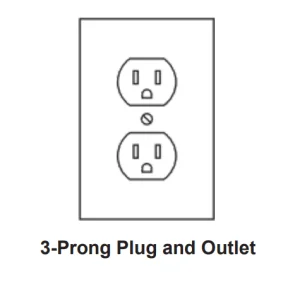
- Tools marked with “Grounding Required” have a three-wire cord and a three-prong grounding plug. The plug must be connected to a properly grounded outlet. If the tool should electrically malfunction or break down, grounding provides a low-resistance path to carry electricity away from the user, reducing the risk of electric shock. (See 3-Prong Plug and Outlet.)
- The grounding prong in the plug is connected to the grounding system in the tool through the green wire inside the cord. The green wire in the cord must be the only wire connected to the tool’s grounding system and must never be attached to an electrically “live” terminal. (See 3-Prong Plug and Outlet.)
- The tool must be plugged into an appropriate outlet, properly installed and grounded in accordance with all codes and ordinances. The plug and outlet should look like those in the preceding illustration. (See 3-Prong Plug and Outlet.)
Ground Fault Circuit Interrupter (GFCI)
Your machine is equipped with a ground fault circuit interrupter (GFCI), which protects you against shock if a short circuit should occur. Check that the receptacle is grounded correctly and test the GFCI before each use.
- Plug the GFCI Power Plug into a grounded, 120 VAC electrical outlet.
- Press the TEST button. The GFCI indicator light will go out, and the machine’s power should shut off.
- WARNING! If the light does not go out when the test button is pushed, the equipment should not be used until proper repairs can be made.
- To restore power after the test, push the reset button. WARNING! If the machine doesn’t start or stops while running, or if you experience a mild shock, do not use it. Have it repaired or replaced by a licensed electrician.
Note: The Power Cord is not GFCI protected from the GFCI unit to the 3-prong Plug in the electrical outlet.
Extension Cords
- Grounded tools require a three-wire extension cord, While Double-Insulated tools can use either a two-wire or three-wire extension cord.
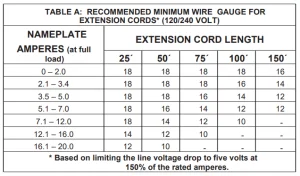
- As the distance from the supply outlet increases, you must use a heavier gauge extension cord. Using extension cords with inadequately sized wire causes a serious drop in voltage, resulting in loss of power and possible tool damage. (See Table A on page 7.)
- The smaller the gauge number of the wire, the greater the capacity of the cord. For example, a 14-gauge cord can carry a higher current than a 16 gauge cord. (See Table A.)
- When using more than one extension cord to make up the total length, make sure each cord contains at least the minimum wire size required. (See Table A.)
- If you are using one extension cord for more than one tool, add the nameplate amperes and use the sum to determine the required minimum cord size. (See Table A.)
- If you are using an extension cord outdoors, make sure it is marked with the suffix “W-A” (“W” in Canada) to indicate it is acceptable for outdoor use.
- Make sure the extension cord is properly wired and in good electrical condition. Always replace a damaged extension cord or have it repaired by a qualified electrician before using it.
- Protect the extension cords from sharp objects, excessive heat, and damp or wet areas.
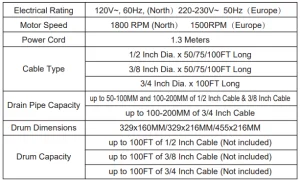
Drain Cleaner Machine Specifications
Setup- Before Use
Read the ENTIRE IMPORTANT SAFETY INFORMATION SECTION AT THE BEGINNING OF THIS MANUAL, including all text under subheadings therein, before setting up or using this product.
Functions
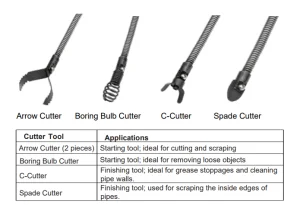
Cutting Tool Accessories
Each drain cleaner includes four Cutting Tools. Select the appropriate tool for the cleaning job and attach it to the cable. Each is described in the table below.
NOTICE: If the cause of the obstruction is unknown, use the Boring Bulb Cutter to explore the obstruction and, if possible, retrieve a piece to inspect. Once you can see the cause of the obstruction, select the appropriate tool for the job. Run the smallest available tool through the blockage to allow the backed-up water to flow and carry away the debris as the drain is cleaned.
Once the drain is flowing, more appropriate tools can be used on the rest of the blockage.
Keep in mind that the largest tool used should be no bigger than the drain’s inside diameter, minus an inch.
If properly used, use the drain cleaners and assorted drain cleaners.
Accessories will not damage a drain that is in good condition and properly designed, constructed, and maintained.
However, if the drain is in poor condition or has not been properly designed, the drain cleaning work may damage the drain. If possible, visually inspect the drain’s quality before operation.
Drain Cleaner Machine Assembly
⚠️ WARNING
TO PREVENT SERIOUS INJURY FROM ACCIDENTAL OPERATION: Turn the tool’s Rotation Switch to “OFF” and unplug it from its electrical outlet before assembling or making any adjustments to it.
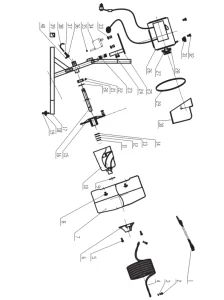
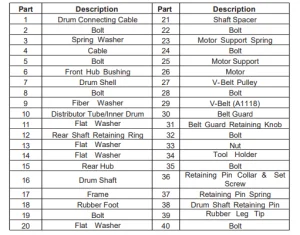
Note: For additional information regarding the parts listed in the following pages, refer to the Assembly Diagram near the end of this manual.
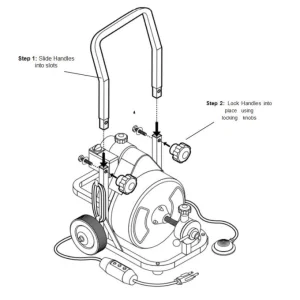
Drain Cleaner Machine Operating Instructions
Tool Set Up
⚠️ WARNING
TO PREVENT SERIOUS INJURY FROM ACCIDENTAL OPERATION:
Turn the Rotation Switch of the tool to its “OFF” position and unplug the tool from its electrical outlet before assembling or making any adjustments to the tool.
TO PREVENT SERIOUS INJURY:
DO NOT OPERATE WITH ANY GUARD DISABLED, DAMAGED, OR REMOVED.
When setting up your drain cleaner, wear ANSI-approved safety goggles, heavy-duty LEATHER work gloves, and other appropriate protective equipment. For extra protection from chemicals and bacteria on the machine and in the work area, we recommend wearing latex, rubber, or other liquid barrier gloves under the heavy-duty work gloves.
Before use, inspect the gloves to be sure they are free of defects or loose sections that could be caught in the Drain Cleaner. Rubber-soled, non-slip shoes can help prevent slipping and electric shock, especially on wet surfaces.
TO PREVENT SERIOUS INJURY FROM ELECTRIC SHOCK, TWISTED/BROKEN CABLES, CHEMICAL BURNS, INFECTIONS, AND OTHER CAUSES, AND PREVENT DRAIN CLEANER DAMAGE:
Before each use, inspect Drain Cleaner and correct any problems.
- Once the Drain Cleaner is assembled, check the device and cutters for signs of wear and damage. If necessary, replace worn or damaged cutters before using the drain cleaning machine. Dull or damaged cutting heads can lead to binding, cable breakage, and slow the drain cleaning.
- Make sure that the device is fully plugged in and inspect the power cord, Ground Fault Circuit Interrupter (GFCI) and plug for damage. If the plug has been modified, is missing the grounding prong or if the cord is damaged, to avoid electrical shock, do not use the machine until a qualified electrician has replaced the cord.”
- Clean all equipment handles and controls of oil, grease, or dirt. This helps prevent the machine or control from slipping during use.
- Verify Foot Switch is attached to Drain Cleaner.
- Verify Drain Cleaner is properly assembled. Inspect the machine for broken, worn, missing, misaligned or binding parts or any other condition which may prevent safe and normal operation.
- Make sure that switches and handles move smoothly between positions and lock in place, and that the bumpers at the bottom of the handle are present and firmly attached.
- Rotate the drum and make sure that it turns freely without binding.
- Check that all warning labels are present, firmly attached, and readable.
- Make sure Belt Guard is securely fastened to the Drain Cleaner.
- Check the cable for wear and damage. If any section is worn or flattened, replace it before use.
- Verify that the cable does not have multiple or excessive kinks (greater than 15°). Kinks weaken the cable and can cause failure. Replace any cables with multiple or excessively large kinks.
- Look for spaces between the cable coils. Kinking, stretching (pulling the cable by hand), or running the cable in reverse can deform the cable. Cables with spaces between the coils should be replaced.
- Check for signs of excessive corrosion. Corrosion weakens the cable, making it brittle. It can be caused by storing the cable wet or using it with corrosive chemicals (often found in chemical clog removers). Excessively corroded cable should be replaced.
- Before use, fully retract the cable with no more than 2” of cable outside of the machine. This will the keep the cable from “whipping” when the machine is turned on.
- Set the Rotation Switch to the OFF position.
- With dry hands, plug the cord into a properly grounded outlet and move the Rotation Switch into the Forward position.
- Move Feed Lever to exactly between F and R settings, otherwise cable will start moving in or out during transport.
- Press the Foot Switch and note the direction of rotation of the drum. If the Foot Switch does not control the Drain Cleaner’s operation, do not use the machine until it has been repaired.
- The drum should rotate clockwise when seen from the front of the drum. It will match the drum direction shown on the warning label and the arrow on the drum. If the rotation is not correct, do not use the machine until it has been repaired.
- After inspection, set the Rotation Switch to OFF, dry off your hands, and unplug the Drain Cleaner.
- Once you’ve verified that the Drain Cleaner is in good working order, inspect the work area where you will be using the machine.
Work Area Set-Up
- Verify that work area has adequate lighting for the job.
- Make sure the work area is free of flammable liquids, vapors, or dust that may ignite. Sparks can be generated during Drain Cleaner operation. Do not work in the area until these sources of ignition have been identified and corrected.
- Choose a firm, stable location for the machine and operator that will remain relatively dry. Do not use the machine while standing in water. If needed, remove the water from the work area.
- Verify the electrical outlet is properly grounded. A three-prong or GFCI outlet may not be properly grounded. If in doubt, have the outlet inspected by a licensed electrician.
- Make sure there is a clear, unobstructed path from the Drain Cleaner to the electrical outlet.
- Inspect the drain to be cleaned. If possible, determine the best access point (s) to the drain, the size(s) and length(s) of the drain, distance to tanks or mainlines, the nature of the blockage, presence of drain cleaning chemicals or other chemicals, etc.
- If chemicals are present in the drain, read and adhere to the specific safety measures required to work around them. Contact the chemical manufacturer for required safety instructions and information.
- If necessary, remove the fixture (toilet, sink, etc.) to allow access to the drain. Do not feed the cable through a fixture; this could damage the Drain Cleaner and the fixture.
- Determine the correct drain cleaning cable size for the job. The cable/Pipe Size chart is below.
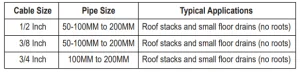
- If needed, place protective covers over the work area floor. Cleaning the clogged drain can be a messy operation.
- Make sure that the Drain Cleaner handle is locked into the upright position for transport. If the Drain Cleaner needs to be lifted, use proper lifting techniques or seek assistance if required. Use caution when moving equipment up and down stairs. Wear appropriate footwear to help prevent slipping on floor.
- Set the Drain Cleaner so that the drum opening is within 2 feet of the drain access. The greater the distance from the drain access, the higher the risk of the cable twisting or kinking.
- If the machine cannot be placed with the drum opening within 2′ of the drain access, use appropriate-sized pipes and fittings to extend the drain access back to within 2′ of the drum opening. Improper cable support can cause the cable to kink and twist, damaging it or injuring the operator.
- If needed, set up barriers to keep bystanders away from the Drain Cleaner and work area during operation.
- Select a proper cutting tool. (See Cutting Tool Accessories ).
- Install the tool at the end of the cable. Slide the base of the Cutter Tool into the slot at the end of the cable. Fasten together using a screwdriver.
- Position the Foot Switch for easy accessibility. You must be able to hold and control the cable, control the Foot Switch, and reach the Rotation Switch.
- Confirm that the Rotation Switch is in the OFF position.
- Run the cord along the clear path. With dry hands, plug the Drain Cleaner into a properly grounded outlet. Keep all connections dry and off the ground.
- If the power cord is not long enough, use an extension cord that is in good condition and has a three prong plug similar to the one supplied on the Drain Cleaner. Keep the connection off the ground to prevent it from accidentally getting wet.
- Also, verify that the extension cord is rated for outdoor use and has a W or W-A in the cord designation (i.e., SOW).
- Verify the extension cord has sufficient wire size (16 AWG for 50′ or less, 14 AWG for 50′ 100 long). Undersized wires can overheat, melting the insulation or causing a fire or other damage.
- The GFCI on the drain cleaner does not protect it when using an extension cord. If the outlet is not GFCI-protected, use a plug-in type GFCI between the outlet and the extension cord. This will reduce the risk of shock if the extension cord is faulty.
Power Feed Operation
TO PREVENT SERIOUS INJURY FROM TWISTED OR BROKEN CABLES, CABLE ENDS WHIPPING AROUND, MACHINE TIPPING, CHEMICAL BURNS, INFECTIONS, ELECTRIC SHOCK, AND OTHER CAUSES:
Follow the operating instructions for your model explicitly.
Since drains likely contain hazardous chemicals or bacteria, wear appropriate protective equipment, such as:
- ANSI-approved splash-resistant safety goggles and respirator under face shield.
- Latex, rubber, or other liquid barrier gloves under heavy-duty LEATHER work gloves. Do not use a glove you are not currently wearing or a rag to hold the rotating cable. Cloth materials can get wrapped around the moving cable, leading to serious personal injury. Before use, inspect gloves to be sure they are free of defects or loose sections that could get caught in Drain Cleaner.
- Rubber-soled, non-slip shoes to help prevent slipping and electric shock.
- After making sure the Rotation Switch is in the “Forward” position, the Tension Knob has been retightened, and the Power Feed Lever is in the down (forward) position, press the Foot Switch to start feeding the cable further into the drain. Make sure you can operate the Foot Switch while having at least one hand on the cable at all times. Also, make sure the Rotation Switch on top of the Drain Cleaner and Power Feed Lever are within reach.
WARNING! Only one person should operate the cable feed and the Foot Switch. Do not operate the Drain Cleaner with one person controlling the cable and another person managing the Foot Switch. This can cause the cable to kink, twist, and break, which can also lead to serious personal injury.
- If the cable becomes lodged (for example, in a narrow part of the drain in a drain trap, etc.), put the Power Feed Lever in the “neutral” position and allow the cable to try and work itself past the obstruction.
- If the cable still won’t pass the obstruction, release pressure from the Foot Switch and use sharp downward thrusts to try to pass it. Once the cable is past, put the Power Feed Lever in the down (forward) position, press the Foot Switch, and continue feeding.
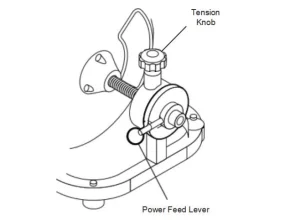
Working Through a Blockage
- If the cutting tool becomes lodged in a blockage and the Drain Cleaner is still operating, the cable will start to wind up or twist. If so, release pressure from the Foot Switch, and the Drain Cleaner motor will stop.
WARNING! Do not let cable build up outside the drain.
- The cable and drum will turn backwards until the tension in the cable is released.
WARNING! Do not remove the gloved hand from the cable until all the tension is released.
- Put the Power Feed Lever in the “reverse” position to pull the cable back and free the cutting tool from the blockage.
- If the motor can’t pull the cable out, release the pressure from the Foot Switch and allow the cable to stop spinning. Once it has stopped spinning, grab the cable with both gloved hands and pull it free.
- Once the tool is free of blockage and is turning again, slowly feed the rotating cutting tool back into the blockage. Do not force the tool through the blockage. Allow the cutting tip to break up and work through the blockage.
CAUTION: While working through the blockage, the tool and cable can become clogged with debris, preventing further cleaning. The cable and tool will then need to be retrieved from the drain and debris removed.
Retrieving Drain Cleaner Cable
- Once the drain is clear, turn on the faucet or use a hose to flush debris out. NOTE: If water flow slows or stops, resume using the drain cleaner to locate and clear the blockage further down the drain.
- To retrieve cable, set the Power Feed Lever in the reverse (up) position, but make sure the Rotation Switch is still in the Forward position. WARNING! Do not retrievethe cable with the Rotation Switch set in the Reverse position.
- Keep one hand on the cable. The cable can get caught while being retrieved.
- Continue retrieving the cable until you can pull it by hand. Release the foot from the Foot Switch. WARNING! Do not pull the cable from the drain while it is still rotating. The cable can whip around, causing serious injury.
- Place the Rotation Switch in the OFF position, dry your hands, and unplug the machine.
- Release the Tension Knob tension and pull the remaining cable from the drain by hand and feed it into the Drain Cleaner. If needed, change the cutting tool and continue cleaning.
Maintenance and Servicing
⚠️ WARNING
TO PREVENT SERIOUS INJURY FROM ACCIDENTAL OPERATION:
Tum the Rotation Switch of the tool to its “OFF” position and unplug the tool from its electrical outlet before performing any inspection, maintenance, or cleaning procedures.
TO PREVENT SERIOUS INJURY FROM TOOL FAILURE:
Do not use damaged equipment. If abnormal noise or vibration occurs, have the problem corrected before further use.
Cleaning Drain Cleaner Cables
- Thoroughly flush Drain Cleaner cables with clean water after every use. Doing so will help prevent the build-up of sediment and any drain cleaning chemicals still in the cable.
- Once cables have been flushed, carefully tip the Drain Cleaner forward to empty out any remaining debris.
- Once the cable is clean and dry, pull the cable from the drum.
- Lubricate with oily rag as you feed cable back into drum.
WARNING! Do not attempt to remove a rotating cable.
Cleaning/Lubricating the Drain Cleaner Machine Housing
- Loosen the Belt Guard Knob and slide the Belt Guard off from the top of the Drain Cleaner motor.
- Use a screwdriver to slide the belt off the back of the Drain Cleaner drum.
- Slide the new belt into the belt pulley above the drum.
- Slide the new belt onto the rear of the drum until it is securely in place.
- Slide the Belt Guard pack into place above the Drain Cleaner drum. Tighten the Belt Guard Knob to lock the Belt Guard back into place.
WARNING! Do not operate the Drain Cleaner without the Belt Guard in place.
- Remove old cable by pulling cable completely out. Separate the cable from the drum-connecting cable.
- Connect the new cable to the drum-connecting cable and feed the cable back into the drum.
General Cleaning, Maintenance, and Lubrication
- BEFORE EACH USE, inspect the general condition of the tool. Check for:
- Loose hardware
- misalignment or binding of moving parts
- Cracked or broken parts
- Damaged electrical wiring
- Any other condition that may affect its safe operation.
- AFTER USE, wipe external surfaces of the tool with clean cloth.
- WARNING! If the supply cord of this power tool is damaged, it must be replaced only by a qualified service technician.
Troubleshooting the Drain Cleaner Machine
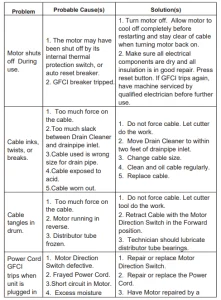
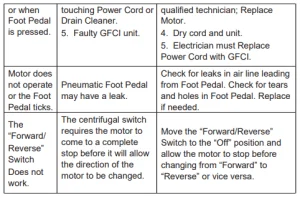
Parts Lists and Diagrams
Recommended For Your Project
VEVOR Drain Cleaner Machine 100 FT x 1/2 Inch Manual



Reviews
There are no reviews yet.