
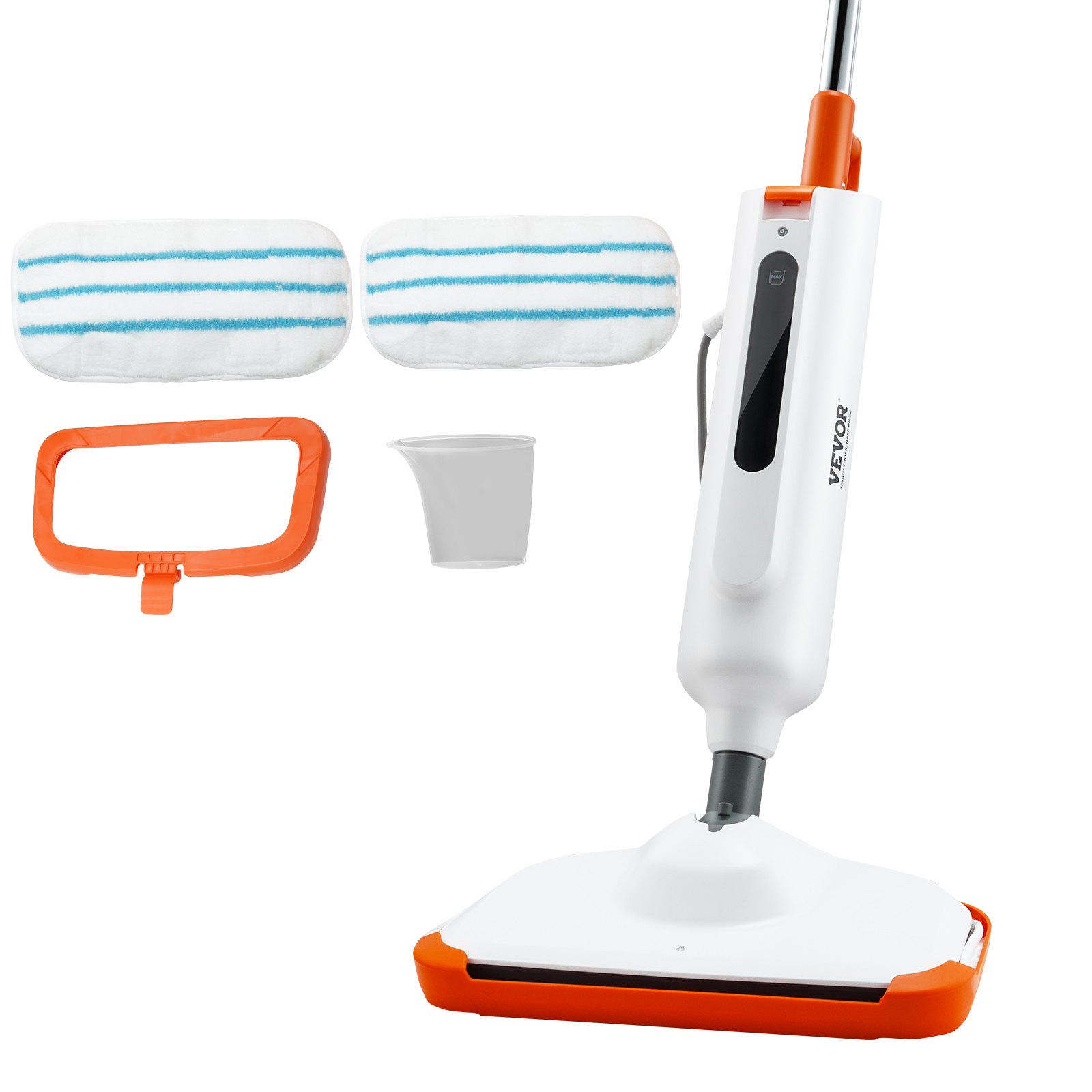
Unlock the full potential of your VEVOR Steam Mop with our comprehensive product manual download. Our 2-in-1 Hard Wood Floor Cleaner is designed for various hard floors, including ceramic, granite, marble, linoleum, and natural floors. The manual provides detailed instructions on setup, troubleshooting, and optimization, ensuring you get the most out of your steam mop.
With easy-to-follow steps and helpful illustrations, you’ll quickly learn how to utilize the included water tank and machine washable pads effectively.
Whether you need guidance on initial setup or tips for maintaining pristine floors, our manual is your go-to resource. Download it today and take the first step towards a cleaner, healthier home with the VEVOR Steam Mop.
VEVOR Steam Mop User Manual
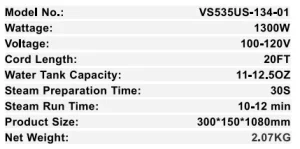
Model: VS535US-134-01
IMPORTANT SAFETY INSTRUCTIONS
READ ALL INSTRUCTIONS BEFORE USING YOUR STEAM MOP
When using an electrical appliance, basic precautions should be observed, including the following:
- Always connect to a polarized outlet(left slot is wider than right)
- Unplug from the outlet when not in use and before conducting maintenance
WARNING
TO REDUCE THE RISK OF FIRE, ELECTRIC SHOCK, OR INJURY:
- Do not direct steam at people, animals, or at electrical outlets.
- Do not expose to rain.
- Store indoors.
- Unplug from the outlet when not in use and before conducting maintenance or troubleshooting.
- Do not leave the steam cleaner unattended.
- Do not expose hair, loose clothing, fingers, or body parts to openings or moving parts.
- Do not service the steam cleaner when it is plugged in.
- Do not handle the steam cleaner with wet hands.
- Do not use steam cleaner if it has been dropped, damaged, left outdoors or dropped into water, return it to a service center.
- Do not pull or carry by cord, use cord as a handle, close door on cord, pull cord around sharp corners or edges, or expose cord to heated surfaces.
- Do not unplug by pulling on the cord.
- Do not use the appliance in an enclosed space filled with vapor from oil-based paint, paint thinner, moth-proofing substances, flammable dust, or other explosive or toxic vapors.
- Please do not allow it to be used as a toy.
- Do not use on leather, wax-polished furniture or floors, synthetic fabrics, velvet, or other delicate, steam-sensitive materials.
- Do not immerse
- Not for space heating purposes
- Please do not use it for any purpose other than what is described in this Steam mop manual.
- Use only the manufacturer’s recommended attachments. Attachments not provided or sold by may cause fire, electric shock, or injury.
- Never put descaling, aromatic, alcoholic, or detergent products into the steam cleaner, as this may damage it or make it unsafe for use.
- Unplug by grasping the plug, not the cord
- Close attention is necessary when used by or near children
SAVE THESE INSTRUCTIONS FOR FUTURE USE
This model is for household use only. Commercial use of this unit voids the manufacturer’s warranty.
THIS APPLIANCE HAS A POLARIZED PLUG
This appliance has a polarized plug to reduce the risk of electric shock (one blade is wider than the other). This plug will git in a polarized outlet only one way. If the plug does not fit fully, a qualified electrician should install a proper outlet. Do not change the plug in any way.
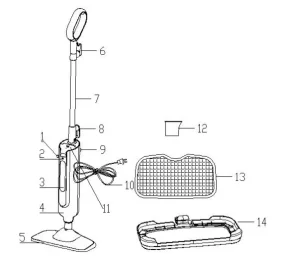
PRODUCT VIEW
- Power Cord interface
- Steam Indicator
- Water Tank
- Lower Body
- Mop Head
- Wire Hook
- Mental Tube
- Wire Hook
- Power Switch
- Power Cord
- Water Inlet
- Water Cup
- Mop Pad
- Carpet Glider
ASSEMBLY
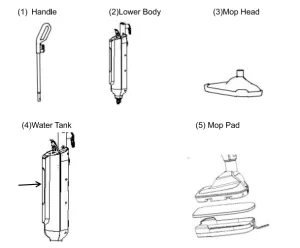
The steam mop can be assembled quickly and easily. It is packaged with the following items:
Assemble Instructions
- Attach the lower body to the mop head by snapping it into place.
- Install the metal tube into the lower body until it locks into the right place.
- The water tank is inside the main body. It does not need to be installed.
- The steam mop assembly is now completed.
Steam Mop Operations
Special Features
Water Tank
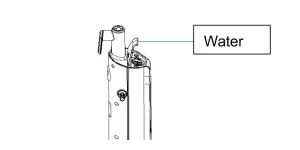
The water tank is located on the upper part of the main body. Tap water should be replaced with distilled or demineralized water.
Note:
- Turn off the steam mop when taking the water tank off.
- Fill the water tank with the water cup.
- Do not use chemicals in your steam mop’s water tank.
Steam Control
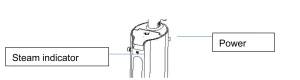
The steam control indicator light will stop blinking when the steam mop is ready to use
Note:
- Press the steam mop power switch first.
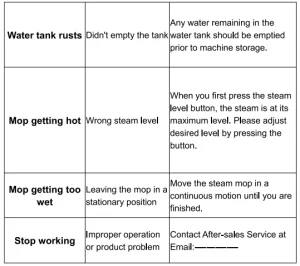
- Please note that when you first press the steam level button, the steam is at its maximum.
- Please adjust your desired level by pressing the button.
Microfiber Mop Pads
Reusable microfiber mop pads are machine washable and safe for all hard floor surfaces. Your steam mop may have come with two different pads. The white microfiber pad is best for everyday use on delicate flooring like sealed hardwoods and laminate.
The grey and white striped pad can scrub heavily soiled floors and clean tougher messes.
Getting Ready
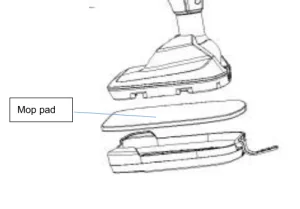
The mop pad may have already come attached to the mop head.
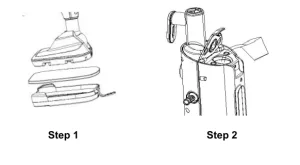
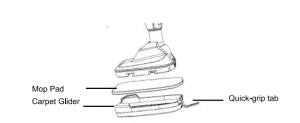
- Set the mop head in the mop pad, ensuring the quick-grip release tab is on the back.
- Open the water cap and then fill the water tank with water
- Quickly release the power cord and insert it into the 120-volt power socket
- The indicator will light up when the steam mop is ready to use. Press the steam level button to select the steam level you want.
NOTE: Upon first use of the steam mop or first use after refilling the water tank, the pump may make a “knocking” sound. This is normal and should only last a few seconds.
Operations
Before Cleaning
Thoroughly sweep or vacuum the floor before cleaning with the steam mop for hard floors.
Your steam mop is designed to clean hard flooring such as ceramic tile, vinyl, laminate, marble, stone, and sealed hardwood floors. Using your steam mop on waxed or some unwaged floors may result in diminished glossiness. The steam mop is not for an inconspicuous area, and check the care instructions from your flooring manufacturer.
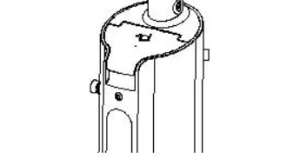
- Plug the unit in and wait 30 seconds for it to heat up. Begin cleaning by slowly passing the unit over the floor surface.
Note:
Press the power switch before you press the steam control. When you first press the steam level button, the steam is at its maximum level.
- To turn off the steam mop, continue to press the steam level button until the blue light is illuminated above the steam level button
- When the steam mop stops emitting steam, unplug the unit. Refill the water tank and continue steaming.
NOTE: Be sure to disinfect the floor, use a microfiber mat, and wipe it back and forth at least three times with continuous steam. For beat results, remove the liner and clean it after.
Carpet Gilder
This accessory attaches to the steam mop, allowing it to slide over and clean the carpet.
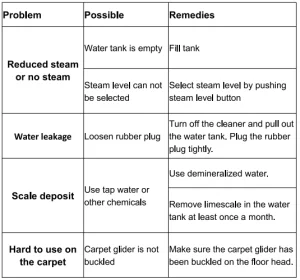
NOTE: Please ensure the carpet gilder is buckled on the floor head. It will fall out when the steam mop is used if it is not in the correct position.
NOTE: Move the steam mop continuously until you are finished. DO NOT leave it stationary.
Steam Mop Maintenance & Care
- Unplug the power cord from the outlet.
- Carefully remove the mop pad from the mop head. The mop pad and lower assembly may be hot.
- Any water remaining in the water tank should be emptied before machine storage
- Mop pad can be machine-washed in warm water. Use only liquid detergents. Do not use fabric softeners or bleach for best results, air dry.
- Wrap the power cord around the hook on the back of the steam mop
- Wipe all surfaces of the steam mop with a soft cloth. Store upright in a protected, dry area
TROUBLESHOOTING
WARNING
To reduce the risk of electric shock, turn the power switch off and disconnect a polarized plug from an electrical outlet before performing maintenance or troubleshooting checks.
VEVOR Steam Mop Technical Specifications
Recommended For Your Project
VEVOR Steam Mop, 2-in-1 Hard Wood Floor Cleaner Manual
Reviews
There are no reviews yet.